Board #19: # of Fires in the Amazon – Power BI

Hello!

On this post we’ll see a more “minimalistic” board portraiting the number of fires in the Amazon Rainforest. This is not original from me, but a copy of what was made by the Youtube channel Curbal.

The board was made based on some charts (below) posted by twitter used @g_fiske + a dataset from Kaggle + Rose Charts made on Charticulator.

The columns present in the dataset were: Brazilian States, Latitude, Longitude, Years, Monts, Firespots.

Continue lendo “Board #19: # of Fires in the Amazon – Power BI”

Board #18: E-Commerce Analysis – Power BI

Hello!

On this post I have a dashboard that shows the analysis of an E-Commerce website with data obtained from Google Analytics.

Here we can see the columns:

ps: Only the company has access to Google Analytics results. This originates from an exercise, so I didn’t use google analytics, but had the dataset handed to me.

For this exercise there were some questions to follow on the construction of the board, let’s see them.

Continue lendo “Board #18: E-Commerce Analysis – Power BI”

Board #16: Health Insurance Operators Spending Analysis – Power BI

Hello!

On this post I’ll show you a dashboard that I did for a challenge!

The challenge consisted of being able to answer 10 questions with 1 dashboard. The data source for it was a .csv file that contained a few columns of: Region, Age, Number of Children, Smoker or Not, IMC, Gender, Spending Value.

On the next topic, let’s see the answers to the questions one by one.

Continue lendo “Board #16: Health Insurance Operators Spending Analysis – Power BI”

Board #15: Desemprego x Tempo – Power BI

Oi gente!

Nesse post trago um dashboard composto por 3 gráficos e alguns filtros, onde vemos como o número de desempregados se comportou durante o intervalo de 5 anos, como ele tende a se comportar pelos próximos 5, e como esteve distribuído entre as faixas etárias ativas da sociedade.

Os dados utilizados estão em uma planilha com 4 colunas: Data / Faixa Etária / Gênero / Número de desempregados. Vamos ver como ficou.

Continue lendo “Board #15: Desemprego x Tempo – Power BI”

Board #14: Vendas de Carros – Power BI

Oi pessoal!

O dashboard desse post é novamente relacionado a vendas, porém agora o objeto é: Carros Importados.

O dataset que deu origem a esse dash é uma tabela com diversas informações referentes aos carros, clientes, valores de vendas e custos. Com essas informações, consegui fazer alguns gráficos relevantes para o dono da “Frevo Rides” (fictícia) entender suas vendas e tomar suas decisões com mais facilidade.

Vamos dar uma olhadinha melhor!

Continue lendo “Board #14: Vendas de Carros – Power BI”

Board #13: Dashboard de Vendas – Power BI

Olá!

O board desse post é uma análise de performance de vendas de um determinado estabelecimento com 13 filiais (cada uma em um estado), 11 vendedores e 4 produtos a serem analisados ao decorrer de 2 anos.

A fonte de dados é uma planilha com poucas colunas (estado, vendedor, data da venda, item, preço do item, total de venda, unidades vendidas).

Um pequeno problema que temos é que nem todas as filiais venderam em todos os meses ou anos, então, quando as analisamos em individual, o gráfico de linha pode se tornar um ponto ou ficar vazio. Não é algo errado com os dados, apenas um inconveniente no visual, hahaha.

Vamos dar uma olhada nos diferentes ângulos de análise que conseguimos neste board.

Continue lendo “Board #13: Dashboard de Vendas – Power BI”

Board #12: Google Play Store Apps Analysis – Power BI

Hello, again!

On Board #12 I used a dataset that brings information on Google Play Store, more specifically on 10841 apps available on it.

The columns available in the dataset were: app, category, size, type, content rating, # of reviews, # of intallations, rating, prices, genre, android version.

As some of the data were a bit hard for me to make better, the dashboard turned out simple, let’s see.

Continue lendo “Board #12: Google Play Store Apps Analysis – Power BI”

Board #11: 1 year into my Spotify – Power BI

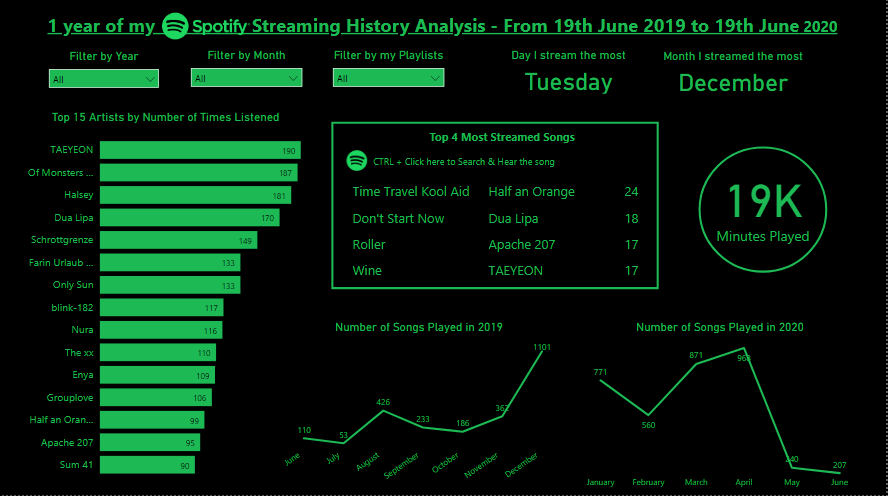
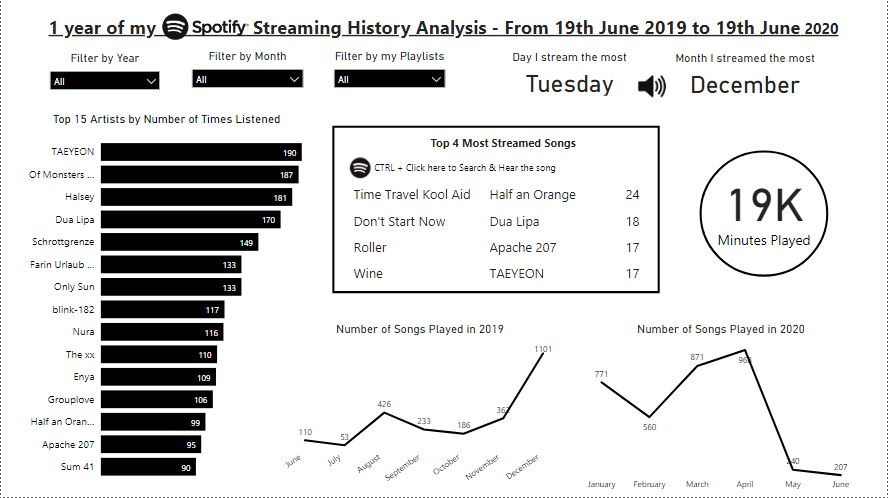
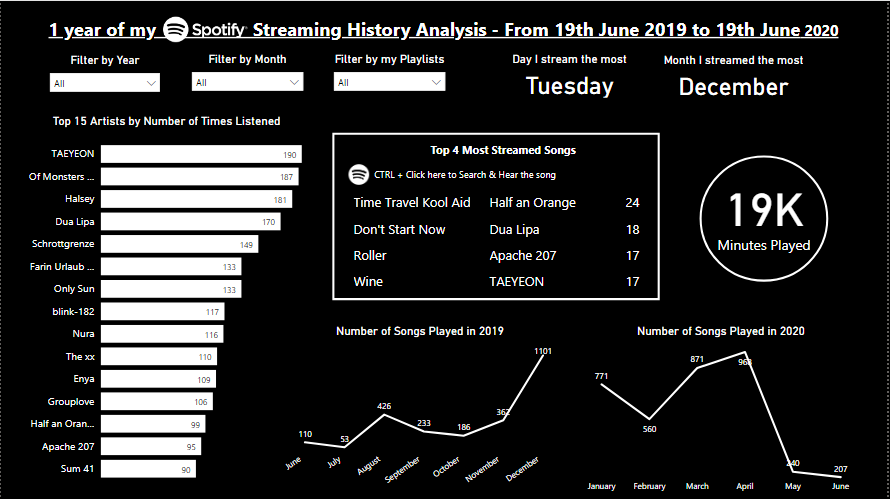
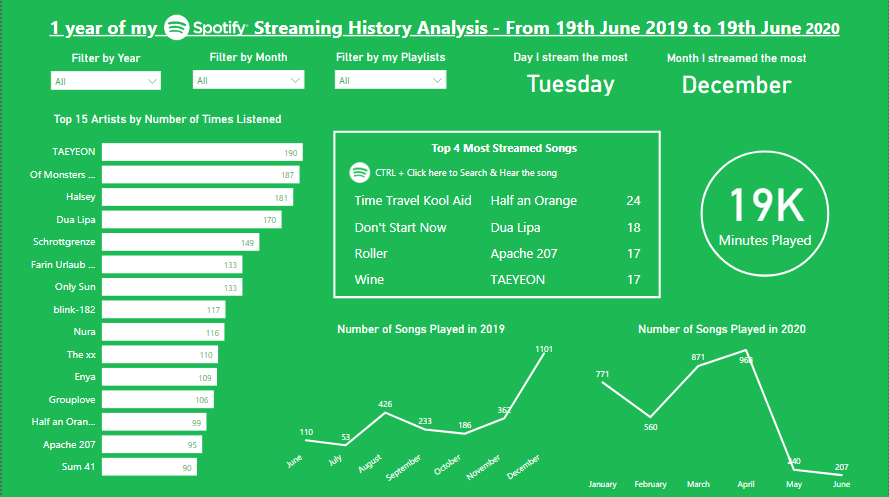
Same board with different color choices

Hello!

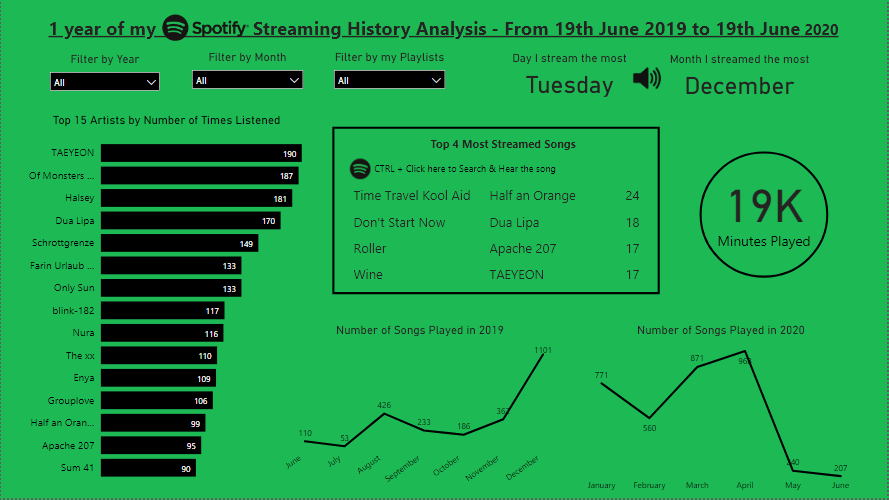
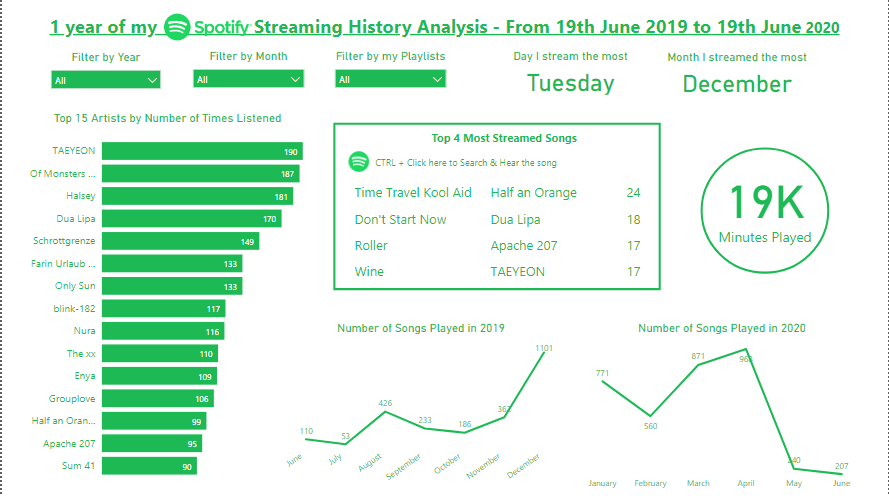
I’m back with a new simple board made on Power BI, this time using my Spotify data (19/06/19 – 19/06/20)!

In case you don’t know, you can request for your data on Spotify’s website, then you receive cool data like: your streaming history, dates, playlists sheet, search queries, followers, payments.

As my activity on Spotify resumes to streaming (no followers, no payments…), I focused on analyzing my artists, songs and habits. Let’s see what I’ve got!

Continue lendo “Board #11: 1 year into my Spotify – Power BI”

Board #10: Pokemon Stats and Pokedex on Power BI

Hello!

On this post I bring a new tool to play with: Power BI!

Power BI is a Business Analytics service by Microsoft, and it’s mainly used to produce interactive business reports and visualizations. I started learning it because I thought it would be a good “upgrade” from excel dashboards.

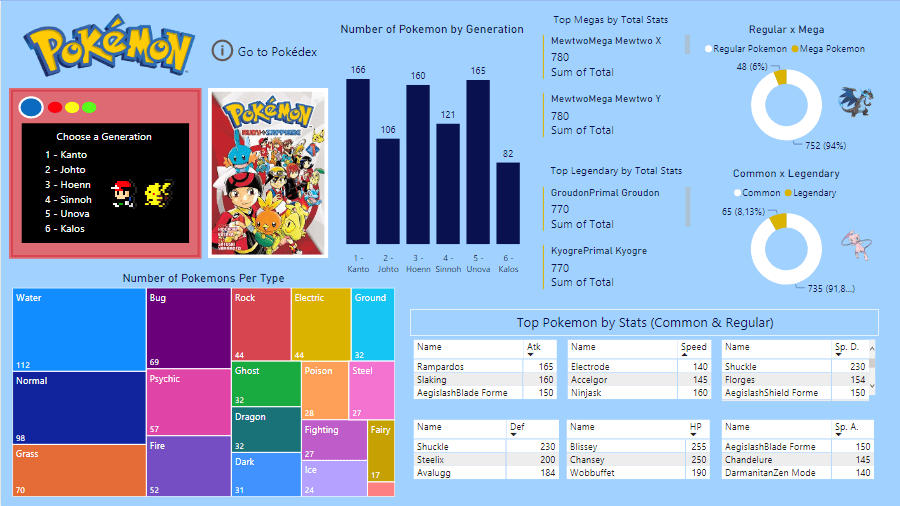
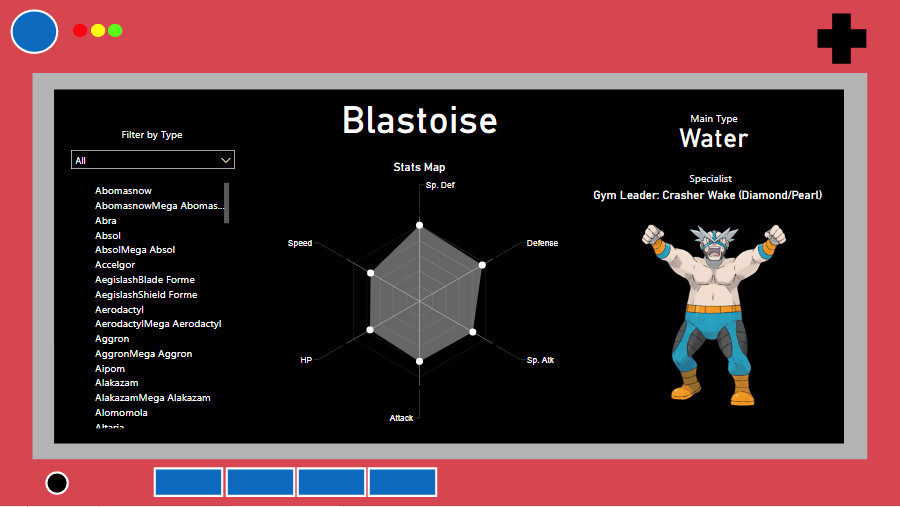
My first Power BI dashboard is about Pokemon, using the same dataset from the Pokemon excel dashboard (check it here). The goal was to create 1 board with general information about pokemon and 1 board to act as a pokedex, so let’s see how they turned out.

Tools used: Power BI – Charts, Cards, Filters

Continue lendo “Board #10: Pokemon Stats and Pokedex on Power BI”

Board #9: Overview of r/travel’s 2018 Survey

Hello!

On this post we’re going to check on my favorite work on Excel so far, and also the biggest one (3 boards). This was done some good time after my last board, which was a time when I was focusing on learning other things, and I believe it shows a lot of growth when we compare it to the previous posts. It’s more analytical, which made me proud and excited to learn more. (:

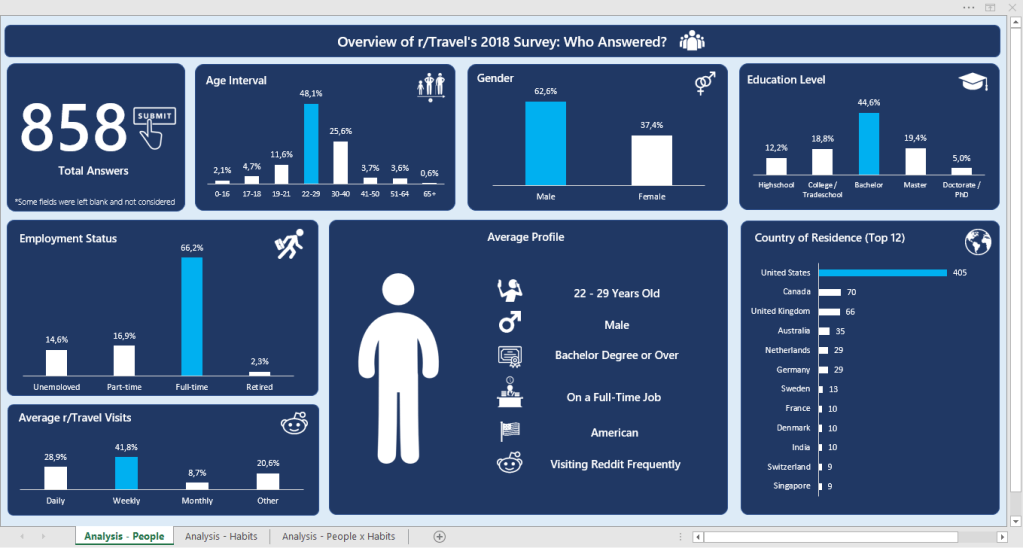
The data for these boards was a formulary (google forms) answered by 858 people who are part of the r/travel subreddit. It contained a lot of columns, so I’d rather leave the link for you to see here.

My idea for the boards was to:

  • 1st: Identify the main persona answering the formulary
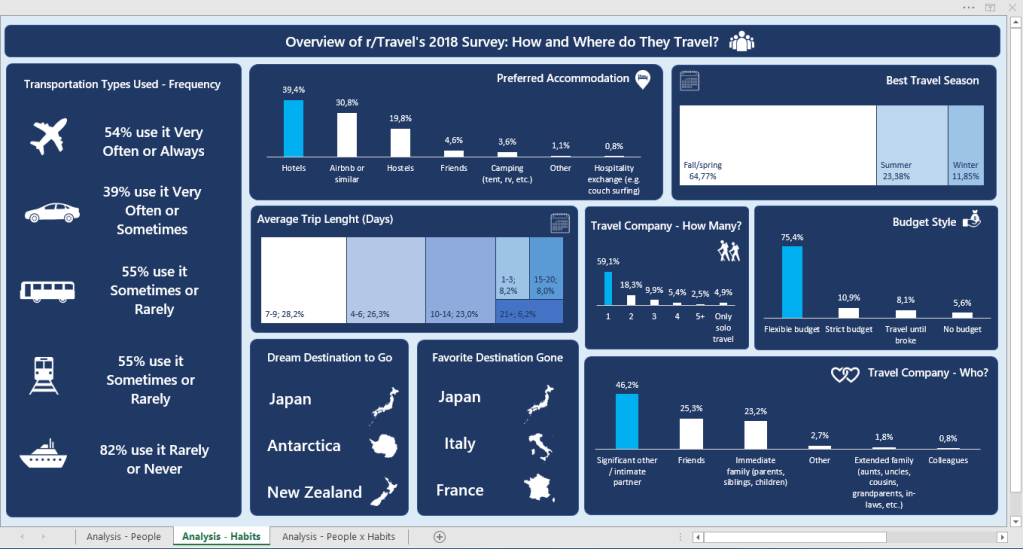
  • 2nd: Identify their habits when traveling
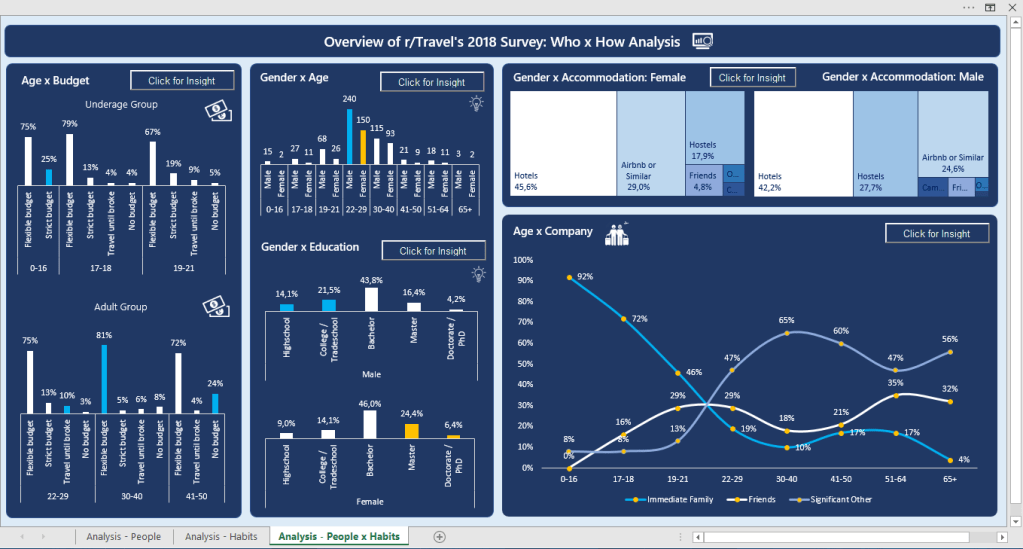
  • 3rd: Cross both information to get some deeper insights

Tools Used: MS Excel – Charts, Pivot Tables; VBA (msgbox)

Continue lendo “Board #9: Overview of r/travel’s 2018 Survey”