#20 – Google Data Analytics Certificate: Bike-Sharing Company Case

Hello, long time no see!

This time I come here with a study case I worked on in order to finish my Google Data Analytics Professional Certificate (yay!). I spent about 4 months studying in the course, which touches a lot on the basics of analysis and of important tools like R and SQL. I’m still not a true ace on them, but I’d say I can handle myself!

This post will be a bit different from the previous ones, as I want to show how I did each phase that Google asked me to go through, from creating the business problem to presenting the insights.

Now, let’s check the case of Cyclistic Bike-Share.

Continue lendo “#20 – Google Data Analytics Certificate: Bike-Sharing Company Case”

Board #19: # of Fires in the Amazon – Power BI

Hello!

On this post we’ll see a more “minimalistic” board portraiting the number of fires in the Amazon Rainforest. This is not original from me, but a copy of what was made by the Youtube channel Curbal.

The board was made based on some charts (below) posted by twitter used @g_fiske + a dataset from Kaggle + Rose Charts made on Charticulator.

The columns present in the dataset were: Brazilian States, Latitude, Longitude, Years, Monts, Firespots.

Continue lendo “Board #19: # of Fires in the Amazon – Power BI”

Board #18: E-Commerce Analysis – Power BI

Hello!

On this post I have a dashboard that shows the analysis of an E-Commerce website with data obtained from Google Analytics.

Here we can see the columns:

ps: Only the company has access to Google Analytics results. This originates from an exercise, so I didn’t use google analytics, but had the dataset handed to me.

For this exercise there were some questions to follow on the construction of the board, let’s see them.

Continue lendo “Board #18: E-Commerce Analysis – Power BI”

Board #17: Oak Company Brazilian Sales – Power BI

Hello!

This time I bring a purple board with some simple charts reflecting the sales market of “Oak Company”.

The dataset for this board contains some localization columns, product related columns and sale price/cost price. With them, we can have an overview of the performance of different cities and products, as well as the view of the revenues through time.

Continue lendo “Board #17: Oak Company Brazilian Sales – Power BI”

Board #16: Health Insurance Operators Spending Analysis – Power BI

Hello!

On this post I’ll show you a dashboard that I did for a challenge!

The challenge consisted of being able to answer 10 questions with 1 dashboard. The data source for it was a .csv file that contained a few columns of: Region, Age, Number of Children, Smoker or Not, IMC, Gender, Spending Value.

On the next topic, let’s see the answers to the questions one by one.

Continue lendo “Board #16: Health Insurance Operators Spending Analysis – Power BI”

Board #12: Google Play Store Apps Analysis – Power BI

Hello, again!

On Board #12 I used a dataset that brings information on Google Play Store, more specifically on 10841 apps available on it.

The columns available in the dataset were: app, category, size, type, content rating, # of reviews, # of intallations, rating, prices, genre, android version.

As some of the data were a bit hard for me to make better, the dashboard turned out simple, let’s see.

Continue lendo “Board #12: Google Play Store Apps Analysis – Power BI”

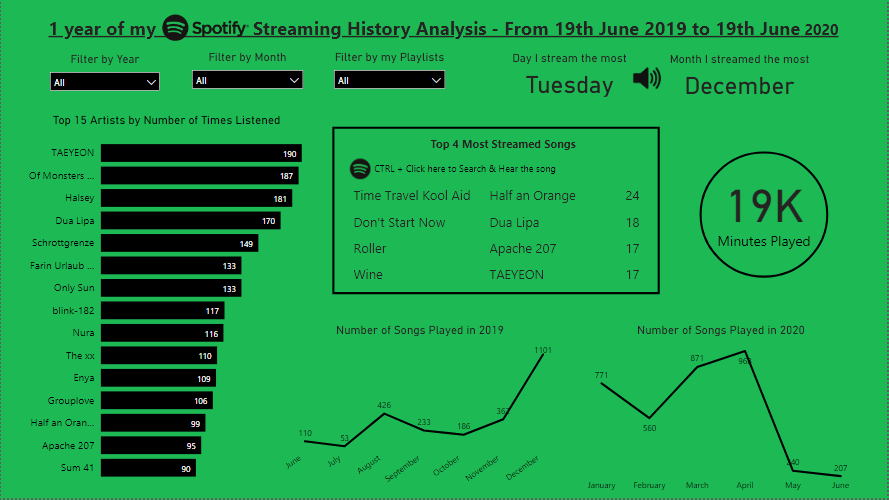
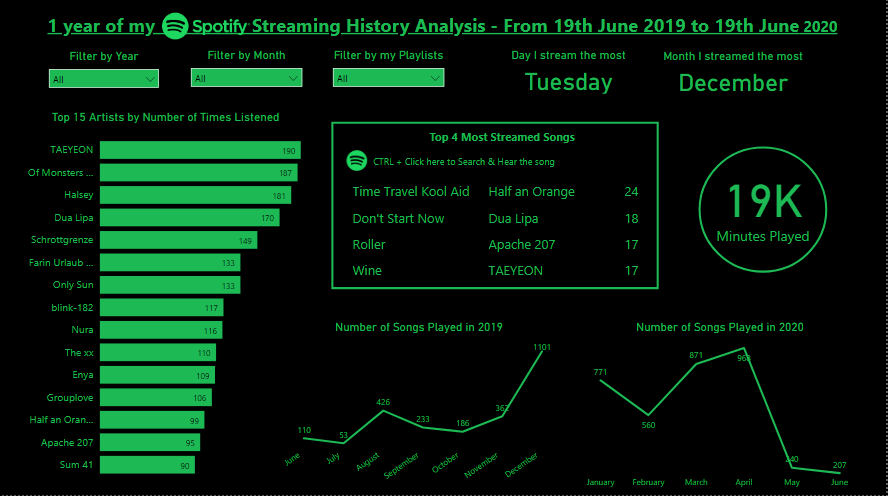
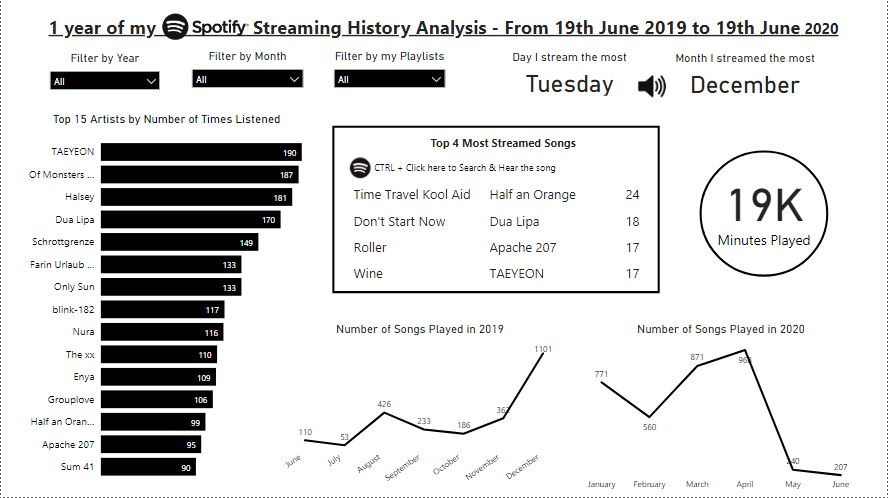
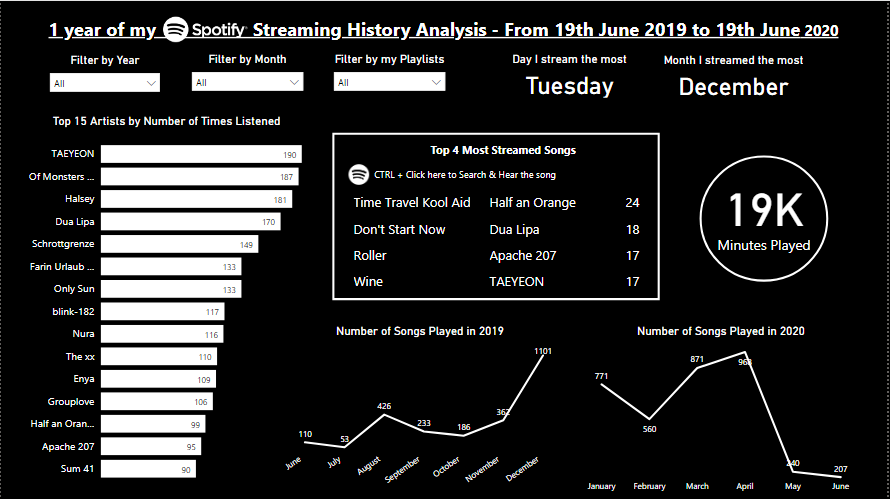
Board #11: 1 year into my Spotify – Power BI

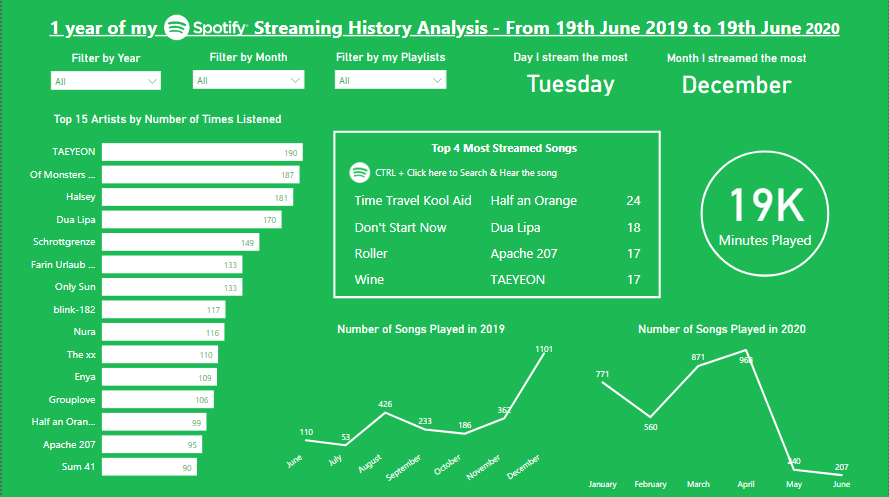
Same board with different color choices

Hello!

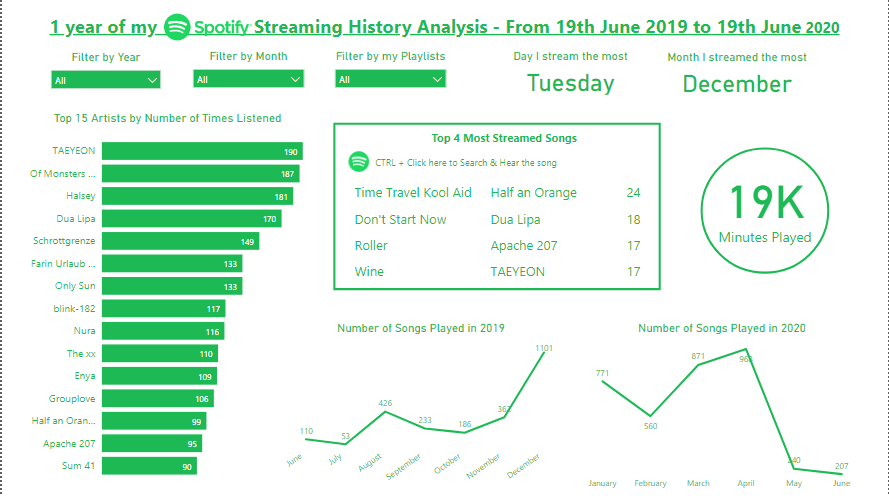
I’m back with a new simple board made on Power BI, this time using my Spotify data (19/06/19 – 19/06/20)!

In case you don’t know, you can request for your data on Spotify’s website, then you receive cool data like: your streaming history, dates, playlists sheet, search queries, followers, payments.

As my activity on Spotify resumes to streaming (no followers, no payments…), I focused on analyzing my artists, songs and habits. Let’s see what I’ve got!

Continue lendo “Board #11: 1 year into my Spotify – Power BI”

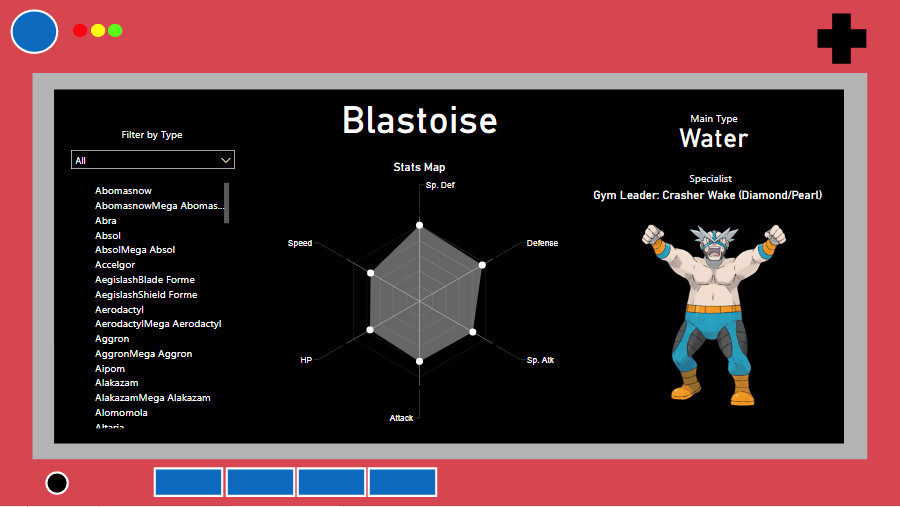
Board #10: Pokemon Stats and Pokedex on Power BI

Hello!

On this post I bring a new tool to play with: Power BI!

Power BI is a Business Analytics service by Microsoft, and it’s mainly used to produce interactive business reports and visualizations. I started learning it because I thought it would be a good “upgrade” from excel dashboards.

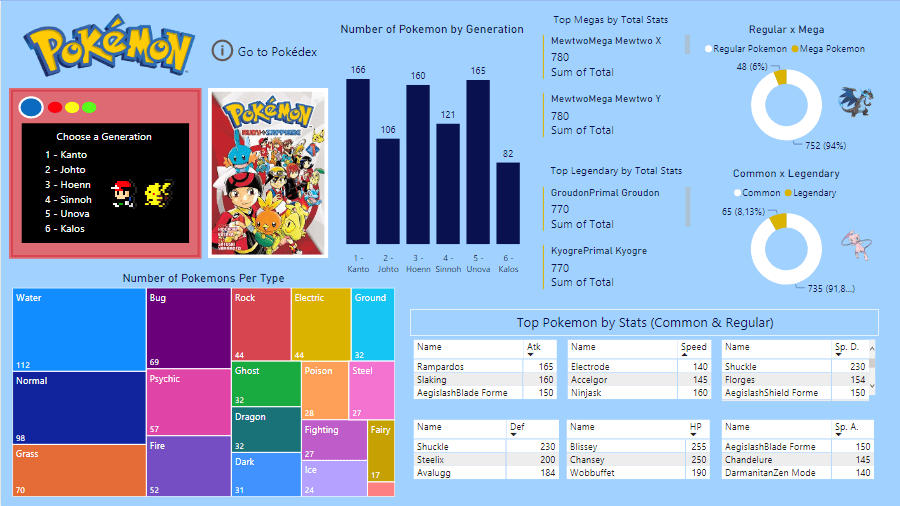
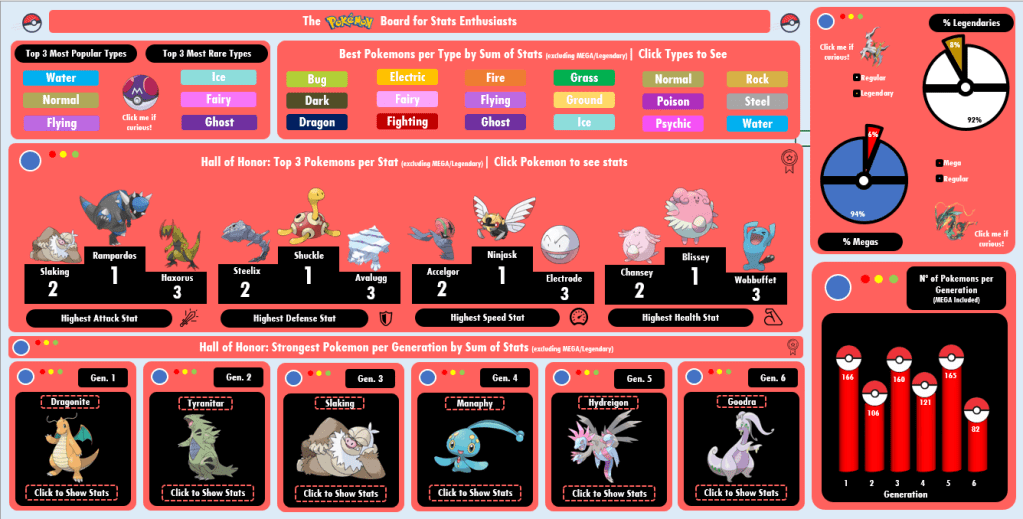
My first Power BI dashboard is about Pokemon, using the same dataset from the Pokemon excel dashboard (check it here). The goal was to create 1 board with general information about pokemon and 1 board to act as a pokedex, so let’s see how they turned out.

Tools used: Power BI – Charts, Cards, Filters

Continue lendo “Board #10: Pokemon Stats and Pokedex on Power BI”

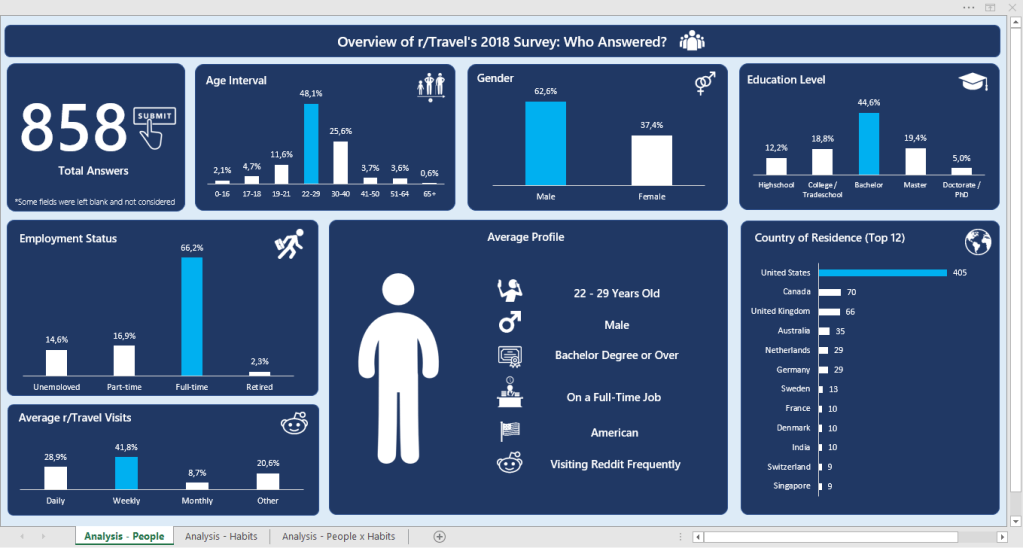
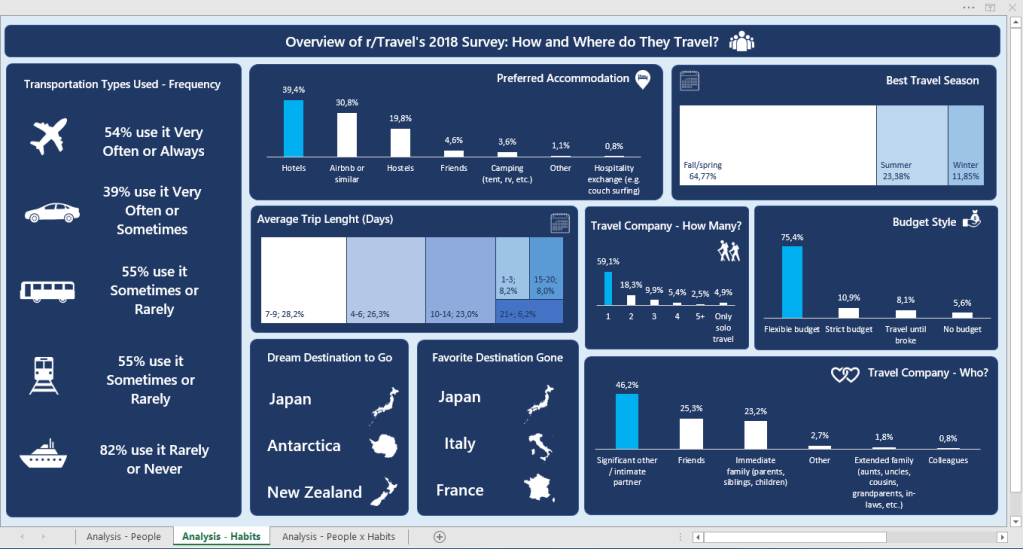
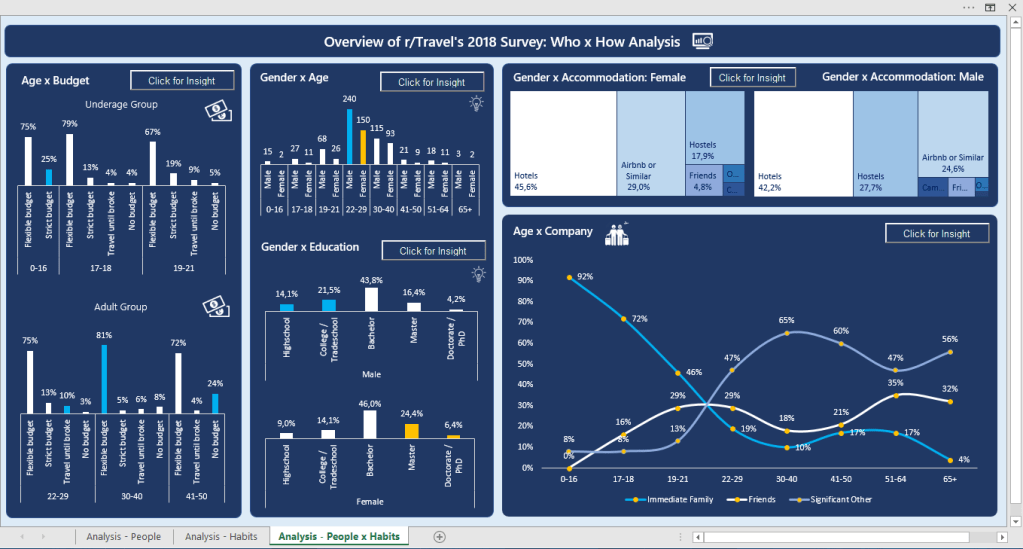
Board #9: Overview of r/travel’s 2018 Survey

Hello!

On this post we’re going to check on my favorite work on Excel so far, and also the biggest one (3 boards). This was done some good time after my last board, which was a time when I was focusing on learning other things, and I believe it shows a lot of growth when we compare it to the previous posts. It’s more analytical, which made me proud and excited to learn more. (:

The data for these boards was a formulary (google forms) answered by 858 people who are part of the r/travel subreddit. It contained a lot of columns, so I’d rather leave the link for you to see here.

My idea for the boards was to:

  • 1st: Identify the main persona answering the formulary
  • 2nd: Identify their habits when traveling
  • 3rd: Cross both information to get some deeper insights

Tools Used: MS Excel – Charts, Pivot Tables; VBA (msgbox)

Continue lendo “Board #9: Overview of r/travel’s 2018 Survey”

Board #8: Fun with Pokemon Stats!

Hello!

I’m back with one of the things I love the most in the world: Pokemon! #nerd

There was no way I wouldn’t think about practicing Dashboards with Pokemon, so I pushed myself to go far on nostalgia to design this one. I found the dataset online long ago (I believe on Kaggle?) and it contained:

  • Pokemon name, Generation, types (main type, secondary type);
  • If the pokemon is legendary or not; If the pokemon has Mega or not;
  • Pokemon stats: HP, Attack, Defense, Speed, Special Attack, Special Defense, Total.
    • The stats are from the Pokemon Games released for GameBoy/Nintendo DS (Red/Blue, Gold/Silver…)

Tools Used: MS Excel – Pivot Table, Charts; VBA (msgbox)

Continue lendo “Board #8: Fun with Pokemon Stats!”