
Hello!
I’m back with one of the things I love the most in the world: Pokemon! #nerd
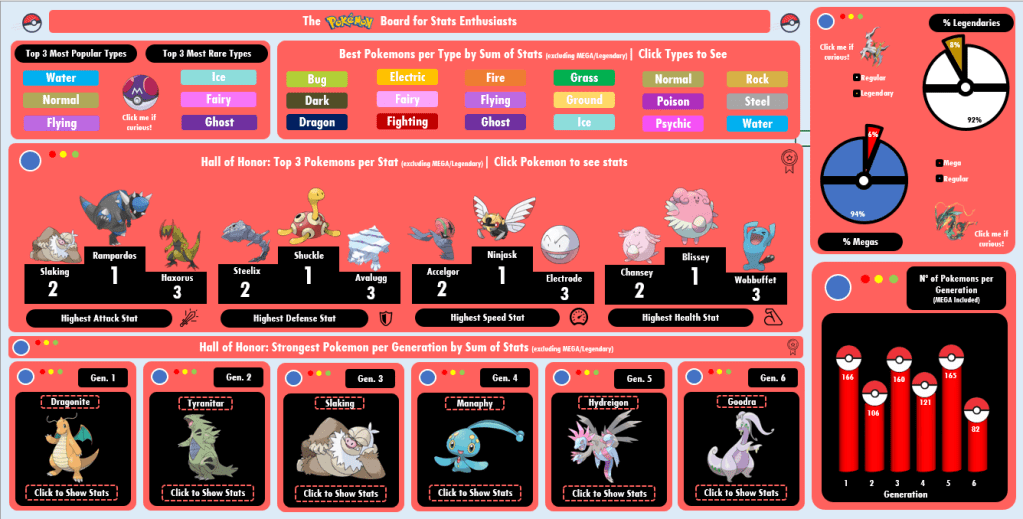
There was no way I wouldn’t think about practicing Dashboards with Pokemon, so I pushed myself to go far on nostalgia to design this one. I found the dataset online long ago (I believe on Kaggle?) and it contained:
- Pokemon name, Generation, types (main type, secondary type);
- If the pokemon is legendary or not; If the pokemon has Mega or not;
- Pokemon stats: HP, Attack, Defense, Speed, Special Attack, Special Defense, Total.
- The stats are from the Pokemon Games released for GameBoy/Nintendo DS (Red/Blue, Gold/Silver…)
Tools Used: MS Excel – Pivot Table, Charts; VBA (msgbox)
Questions & Answers
This board is interesting for both casual fans and for fans who actually use stats to play, since it can be used to purely satisfy curiosity or to show good possibilities of Pokemons to use in game.
Regards Design: In case you didn’t realize, every “box” was inspired on a Pokedex! 🙂
On the right, we can check some numbers data, as how many % of pokemons are legendary? how many have a Mega version? which generation has the highest number of pokemons?
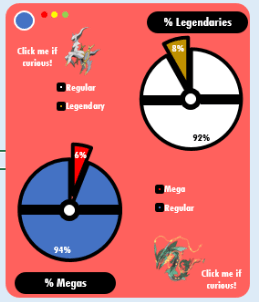
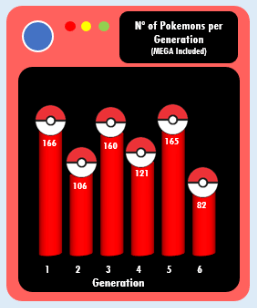
The answers are that not many pokemons are legendary or mega, only less than 10% (which makes sense, right?), and that generations 1, 3 and 5 have the highest number of added pokemons. Would it be the reason why they add less on the generations right after them (2, 4 and 6)? Correlation or coincidence?
VBA magic for fun: With msgbox I created 2 short texts saying who are the most powerful legendary (Deoxys) and Mega (Rayquaza). The msgboxes appear when you click the pokemons close to the pie charts.
Now, about the Halls of Honor below. They basically display the best pokemons according to specific stats (Attack, Defense, Speed and HP) and by generation (sum of all stats).
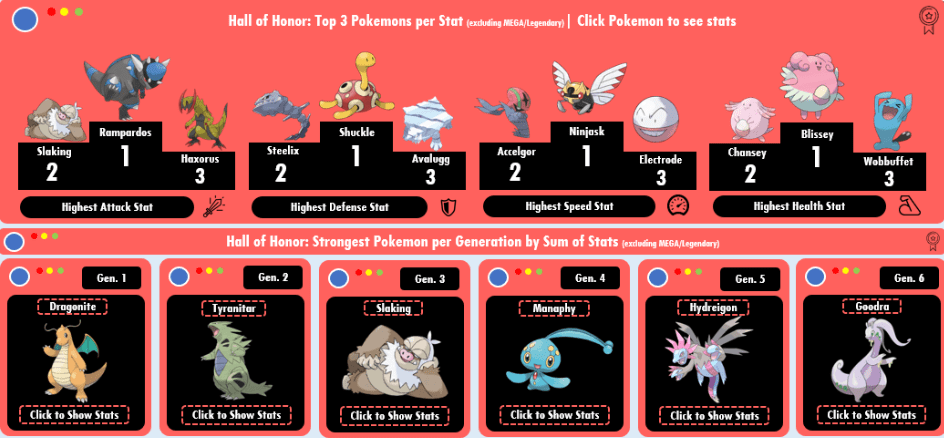
VBA Magic: I added more msgboxes triggered by clicking. On the Hall of Fame 1, you click the pokemons, on Hall of Fame 2 you click in the “Click to Show Stats” button. The msgboxes display information on the pokemon you click!
And finally, about the types! On the left you see the most popular and the rarest types, while on the right you see a “button” for each type existant.

VBA Magic: By clicking the buttons, msgboxes are displayed showing the top 3 strongest pokemons for that type (excluding Mega/Legendary). By clicking on the pokeball (left), you get a msgbox with a curiosity about the types.
That concludes our Pokemon dashboard.
See you next!
 Artisting Data
Um comentário em “Board #8: Fun with Pokemon Stats!”